
Så fungerar CSS-arv och specificitet – komplett guide
Om du någonsin skrivit color: red på ett element och undrat varför texten fortfarande är blå, då har du stött på CSS-specificitetsproblemet. Och om du löste det med !important — ja, då skapade du förmodligen ett nytt problem. CSS-arv och specificitet är två av de mest grundläggande mekanismerna i CSS, men de är också bland de mest missförstådda.
Här reder vi ut hur cascading faktiskt fungerar, varför vissa egenskaper ärvs och andra inte, och hur du räknar ut vilken regel som vinner när flera selektorer pekar på samma element.
Vad är CSS-arv?
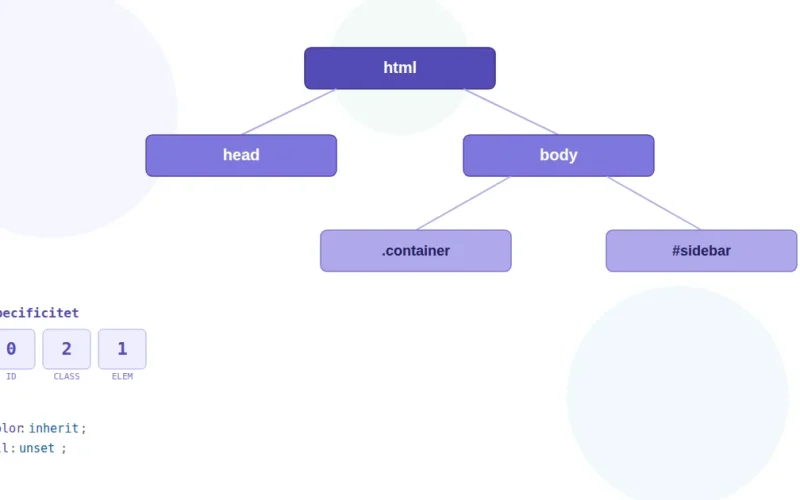
CSS-arv innebär att vissa egenskaper automatiskt flödar nedåt i DOM-trädet från förälderelement till barnelement. Det är därför du kan sätta font-family på body och alla textelement på sidan följer med — du behöver inte upprepa deklarationen på varje <p>, <h2> och <li>.
Men inte alla egenskaper ärvs. Typografi-relaterade egenskaper som color, font-size, line-height och letter-spacing ärvs som standard. Layout-egenskaper som margin, padding, border, width och display gör det inte. Det vore kaos om varje barn-div ärvde sin förälders padding: 2rem.
Tvinga fram eller blockera CSS-arv
Du kan styra arvsbeteendet explicit med nyckelorden inherit, initial och unset:
.child {
  /* Ärv förälderns border trots att border normalt inte ärvs */
  border: inherit;

  /* Återställ till egenskapens initiala värde (CSS-specens default) */
  color: initial;

  /* Om egenskapen normalt ärvs: beter sig som inherit.
     Om den inte ärvs: beter sig som initial. */
  margin: unset;
}
unset är särskilt användbar i kombination med all-egenskapen. Vill du nollställa all styling på ett element och börja om kan du skriva all: unset — det ”nollställer” elementet till antingen ärvda eller initiala värden beroende på egenskap.
Hur CSS cascading fungerar
Cascading är själva kärnan i ”Cascading Style Sheets”. När flera regler försöker sätta samma egenskap på samma element, avgör cascading-algoritmen vilken som vinner. Ordningen är, förenklat:
Först prioriteras regler efter ursprung och !important-flaggan. Webbläsarens standardstilar har lägst prioritet, sedan kommer dina stilmallar, och !important-deklarationer trumfar allt utom andra !important-deklarationer med högre specificitet. Redan här borde det vara tydligt varför !important snabbt blir ohållbart i ett större projekt — du hamnar i en kapprustning med dig själv.
Om ursprunget är detsamma går algoritmen vidare till specificitet. Och om även specificiteten är lika? Då vinner den regel som kommer sist i källkoden. Det är därför ordningen på dina <link>-taggar och @import-satser spelar roll — en komponent-CSS som laddas före utility-CSS kan överskridas av den, även med identiska selektorer.
CSS specificitet – så räknar du rätt
Specificitet är ett poängsystem som avgör vilken selektor som vinner. Det enklaste sättet att tänka på det är som ett tresiffrigt tal: A–B–C.
A räknar antalet ID-selektorer (#header). B räknar antalet klassselektorer (.btn), attributselektorer ([type="text"]) och pseudoklasser (:hover, :focus). C räknar antalet elementselektorer (div, p, h1) och pseudoelement (::before, ::after).
Här är ett konkret exempel:
/* Specificitet: 0-0-1 (ett element) */
p {
  color: black;
}

/* Specificitet: 0-1-0 (en klass) */
.intro {
  color: darkgray;
}

/* Specificitet: 0-1-1 (en klass + ett element) */
p.intro {
  color: steelblue;
}

/* Specificitet: 1-0-0 (ett ID) */
#hero {
  color: tomato;
}

/* Specificitet: 1-1-1 (ID + klass + element) */
div#hero.active {
  color: rebeccapurple;
}
En vanlig missuppfattning är att ”tio klasser slår ett ID”. Det stämmer inte — specificitetsnivåerna är inte decimala. Ett ID (1-0-0) vinner alltid över valfritt antal klasser (0-99-0). Nivåerna jämförs från vänster till höger: om A-värdet är högre vinner den selektorn, oavsett B och C.
Specificitetsregler i CSS att hålla koll på
Inline-stilar (style="color: red") har specificitet 1-0-0-0 — de slår alla selektorer i stilmallar utom !important. Det är ytterligare ett skäl att undvika inline-stilar i produktionskod.
!important bryter helt ur specificitetsordningen. Det bör reserveras för undantagsfall, som att överskriva tredjepartskod du inte kontrollerar. Om du har !important på mer än en handfull ställen i din egen CSS har du troligen ett arkitekturproblem.
Pseudoklassen :where() har alltid specificitet noll, medan :is() och :not() tar specificiteten från sin mest specifika parameter. Det gör :where() till ett kraftfullt verktyg för att skriva återställningar eller defaults som är enkla att överskriva:
/* Specificitet: 0-0-0 – går att överskriva med vilken selektor som helst */
:where(.card, .panel, .box) {
  padding: 1rem;
  border-radius: 8px;
}

/* Specificitet: 0-1-0 – tar specificiteten från .active */
:is(.card, .panel).active {
  border-color: steelblue;
}
CSS-arvsregler och cascade – vanliga fallgropar
Det vanligaste misstaget är att försöka lösa specificitsproblem genom att öka specificitet — lägga till fler klasser, nästla djupare, eller i värsta fall kasta in ett ID. Det fungerar kortsiktigt men gör din CSS svårare att underhålla. Nästa person som ska ändra stilen (inklusive framtida du) måste matcha eller överträffa specificiteten, och plötsligt har du selektorer som div#main .content article p.intro — en klassisk teknisk skuld.
En bättre strategi är att hålla specificiteten låg och konsekvent genom hela projektet. Metodiker som BEM (Block Element Modifier) finns delvis för att lösa just detta — genom att använda enkla klassselektorer överallt hamnar allt på samma specificitetsnivå, och ordningen i stilmallen avgör vem som vinner.
Ett annat vanligt problem är att glömma att CSS-arv inte fungerar genom shadow DOM-gränser i web components. Om du använder custom elements med shadow DOM ärvs typografi-egenskaper genom gränsen, men klasser och selektorer i din globala CSS når inte in. Det kan ge oväntade resultat om du inte är beredd på det.
Felsöka specificitsproblem
Chrome DevTools är ditt bästa verktyg för att förstå varför en regel inte appliceras. I Elements-panelen, under Styles, visas alla matchande regler sorterade efter specificitet. Överstrukna deklarationer har förlorat mot en regel med högre specificitet eller senare ordning. Klicka på en deklaration för att se exakt vilken fil och rad den kommer från.
Firefox DevTools går ett steg längre och visar den beräknade specificiteten direkt bredvid varje selektor — det sparar dig från att räkna manuellt.
Cascade layers – modern CSS-kaskadkontroll
Med @layer (cascade layers) får du ett ytterligare verktyg för att organisera kaskadens prioritet. Layers sorteras i den ordning de deklareras, och regler i en senare layer vinner över en tidigare — oavsett specificitet:
@layer base, components, utilities;

@layer base {
  a { color: steelblue; }
}

@layer components {
  .nav a { color: darkslategray; }
}

@layer utilities {
  .text-red { color: tomato; }
}
Här vinner .text-red alltid, trots att .nav a har högre specificitet, för att utilities-lagret deklarerades sist. Det löser ett av de mest envisa problemen i CSS-arkitektur: att utility-klasser ska kunna överskriva komponentregler utan att behöva !important.
Sammanfattning
CSS-arv och specificitet är inte komplicerade i sig, men de interagerar på sätt som kan överraska. Det viktigaste att ta med sig: håll specificiteten så låg och jämn som möjligt, använd :where() för defaults du vill ska vara enkla att överskriva, undvik !important som standardlösning, och utnyttja @layer om du arbetar med större kodbasar. Förstår du hur cascading-ordningen fungerar — ursprung, specificitet, ordning — kan du felsöka de flesta CSS-konflikter utan att gissa.